

How to Spot a Email Scam?
Another data from Forbes email scams statistics for 2022 reveal that there were 300,497 victims of phishing with a total loss of $52,089,159 in the U.S. alone.
Illinois is the 9th most targeted state for phishing scams.
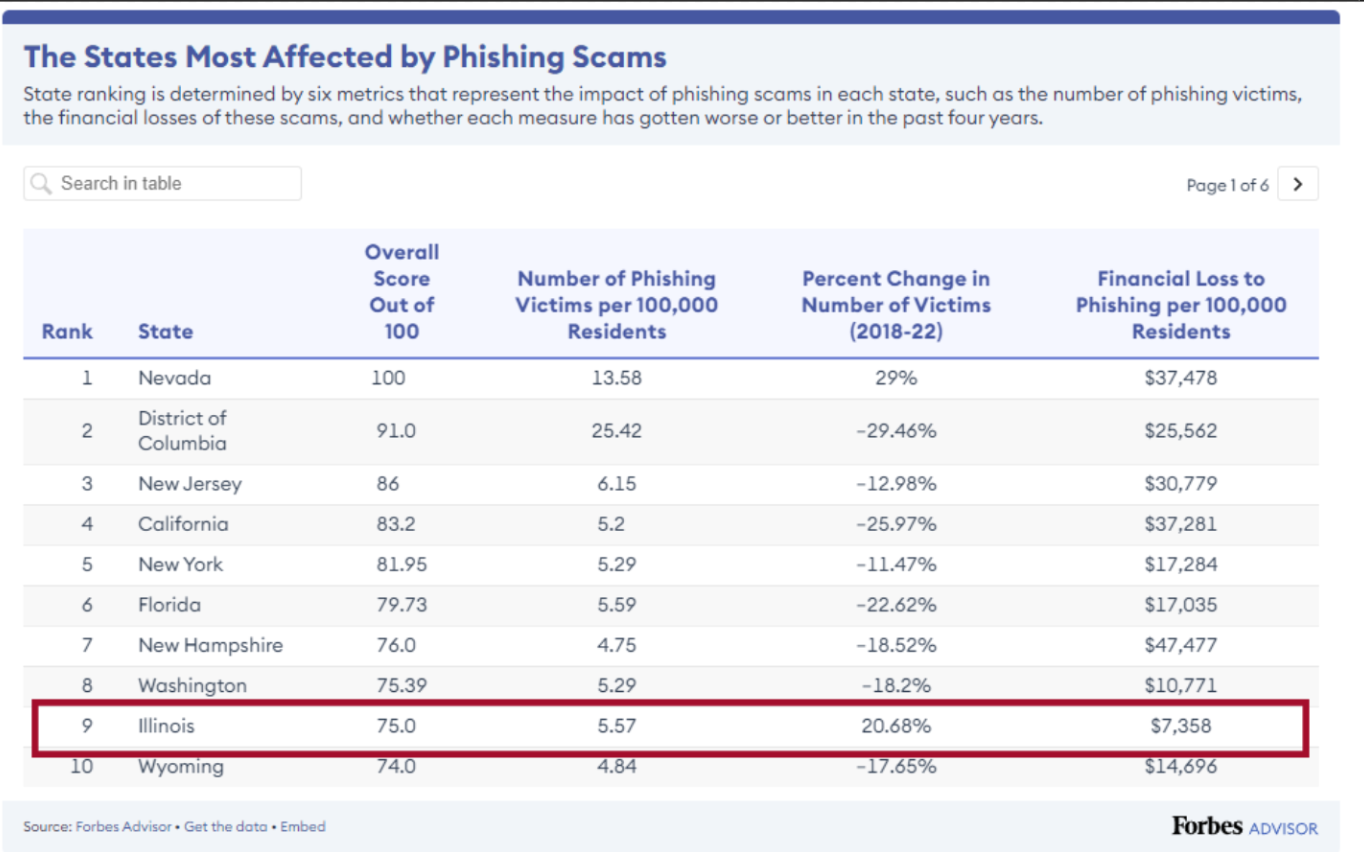
https://www.forbes.com/advisor/business/phishing-statistics/
These statistics make it clear why email scams is considered a major cybersecurity threat for organisations. With a single email, hackers can steal our personal information or infect our devices with malware.
Here are the 3 easy steps to detect Email Scams
1. Beware of Unsolicited Emails
One of the most common red flags of an email scam is receiving an unsolicited message. Email protection measures can help filter out such suspicious emails. Whether it's an offer for a too-good-to-be-true opportunity, just be cautious when you receive emails from unfamiliar senders.
One of our team member got an email titled "Infringement On Business Name Response Required." It seemed official, claiming to be from the "Legal Department of Trademark Pro Services." They said our business name, "**************k Inc," was in trouble due to a potential trademark issue. They warned of legal problems if we didn't act fast.
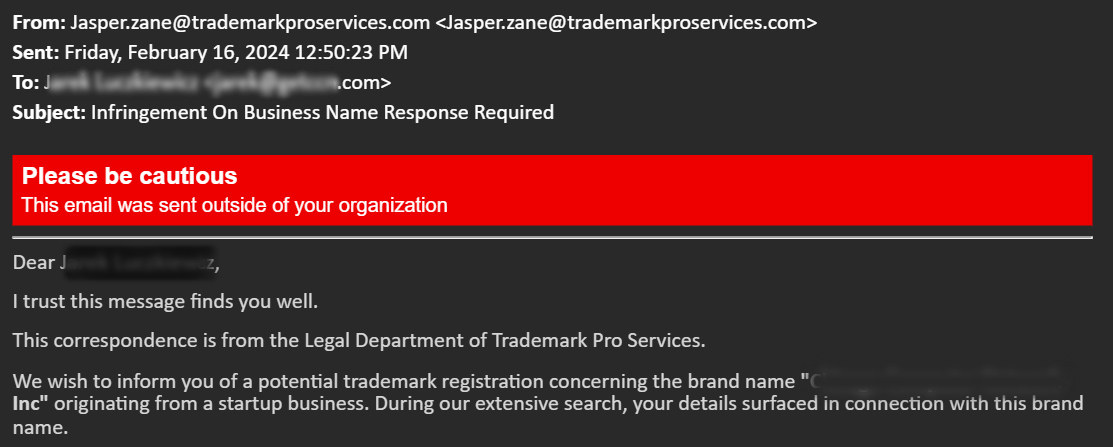
Action needed: Always verify the sender's identity and double-check any claims or requests before responding or providing personal information.
2. Watch Out for Created Urgency, Especially Legal Threats
One common tactic to watch out for in suspicious emails is the urgency to act quickly. Scammers often attempt to create a sense of urgency to pressure recipients into taking immediate action without thinking them. One tactic they use is to threaten legal consequences if you fail to comply with their demands promptly. Here is the actual screenshot of what they sent to one of our team member.
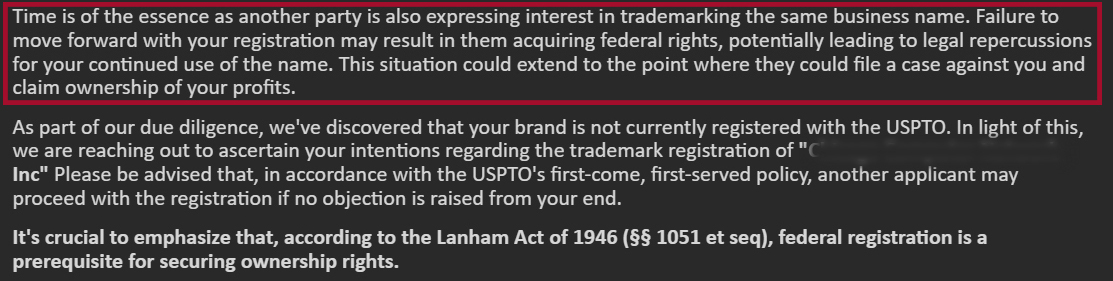
We noticed the email sounded urgent and pushy. Cybercriminals frequently use this tactic to pressure you into acting fast and often ask you for personal information. When you receive these types of emails, just simply ignore them.
3. Verify the Domain
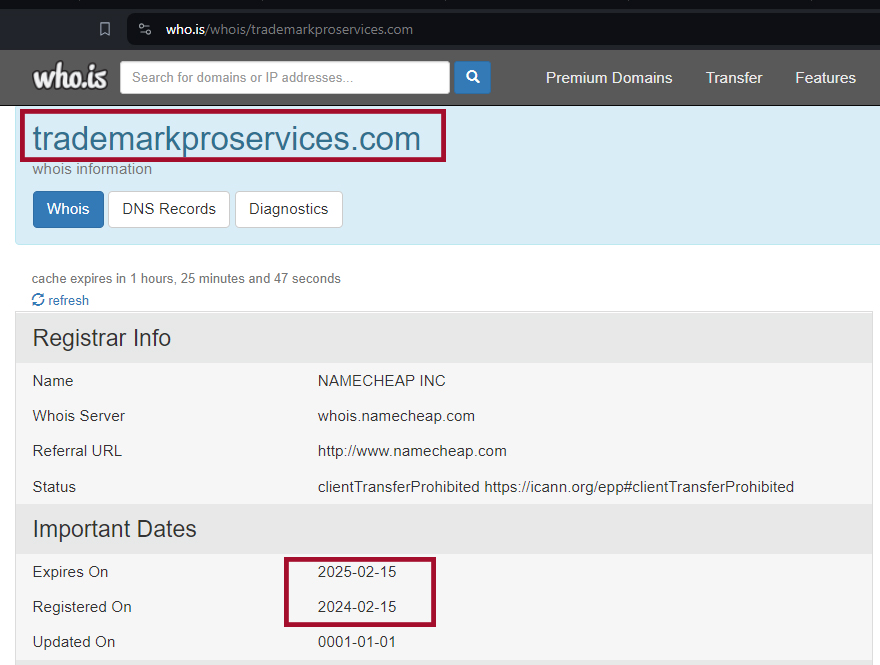
Scammers often create domain names that mimic those of reputable organizations, with slight variations that may go unnoticed at first glance. Before you engage with any email, take a moment to scrutinize the sender's domain.
You can go to who.is and type the domain name, you can see the registration information of the domain. Newly registered domains carry a higher risk of being associated with malicious intent, potentially containing malware. Refrain from opening or trusting emails originating from such domains to protect you from future cyber attack.
Nowadays, when making online payments or transactions, it's hard to be sure if you're safe from online scammers, hackers, and other bad actors.
Good news!
If you're in Illinois or surrounding Chicago area, we have a good news for you. Chicago Computer Network a leading cybersecurity and Managed IT Services provider in Chicago is offering you benefits to combat email spam and enhance your email protection and security.
If you're still unsure about the safety of your data or if you suspect you've encountered online scams or had your information hacked, CCN can help protect you from these threats. Here are the benefits you can enjoy:
- Diminished Risk of Exposure
- Access to Quarantined Mail Reports
- Securing against future Phishing, Malware, and Viruses.
- Secure Communications
- Increased Information Security
- Email Verifications and Backup
Related Articles
Celebrating Excellence: Our Top 30 Ranking in Channel Futures MSP Top 501
We are beyond excited to share that we have secured our place among the elite, ranking in the top 30 of the Channel Futures Top MSP 501 for 2024. This marks not just a win but a consistent recognition of our dedication to excellence in managed services. What is the...
The Importance of Regular IT Audits
Are you aware of your company’s security risks? Do you know if you have adequate protection in place to stop cyber threats? Are you certain that you’re in compliance with all applicable security rules that apply to your business? If you answer “no” to any of these...
Apple’s New Password Manager
If you’re a business owner and a long-time Apple user, you’re likely aware of and use iCloud Keychain for your company. This built-in password manager offers unique autofill, sync, and recovery features on all iPhones, iPads, and Mac products that your employees...